
Business calling made connected
Connect business calling with customer records, sales activity, contacts and other Coree applications from one integrated workspace.
Calls • Contacts • CRM • Call Activity • Customer Records • Follow-Up
Keep business calls connected
Calling inside your business workspace
Use supported VoIP services alongside customer records, contacts and business activity within Coree.
Keep relevant call information connected with the people and business records your team works with.
Connect • Call • Record • Follow Up
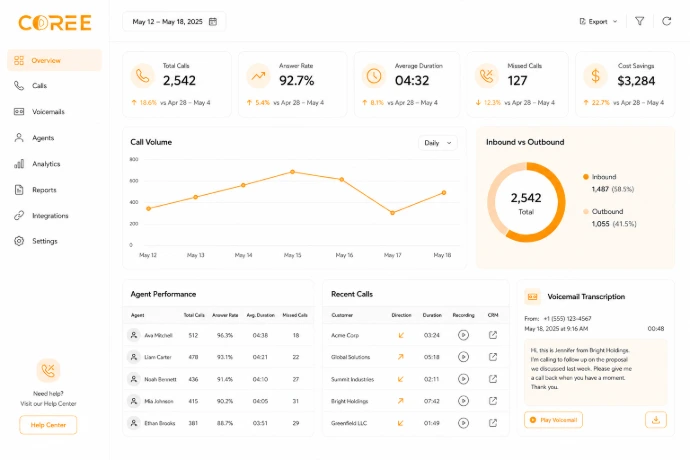
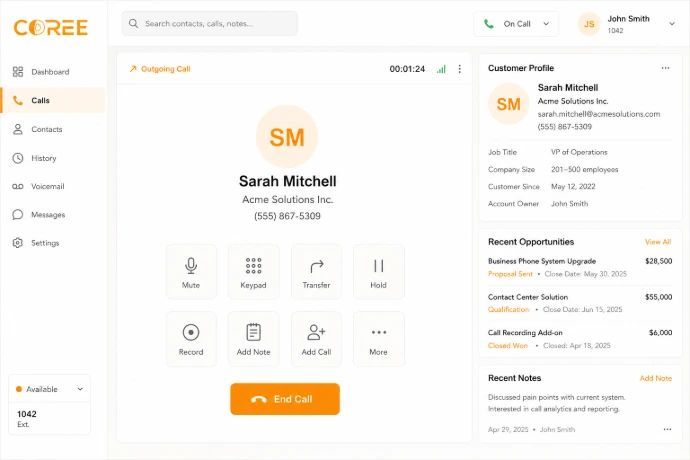
A connected business phone system
Use supported calling features alongside your business records and customer information.
Keep call activity, contacts, notes and follow-up information connected where supported by your VoIP configuration.
Contacts — Call relevant customers and business contacts from connected records.
Call Activity — Keep relevant calling activity associated with business information.
Notes — Keep communication details connected with relevant records.
Follow-Up — Continue customer activity through CRM and sales workflows.
A simple calling workflow
Keep business communication connected from customer records through call activity and follow-up.
Connect
Configure a supported VoIP service for your Coree environment.
Call
Use supported calling options with relevant contacts and records.
Record
Keep relevant call activity and notes connected with business records.
Follow Up
Continue customer activity through CRM, sales or other workflows.
Business calling features
Connect calling activity with contacts, customer records and business communication.
Click to Call
Start supported calls from relevant contacts and business records.
Call Activity
Keep relevant calling activity connected with customer information.
Call Information
Keep relevant notes and communication details associated with records.
Customer Connection
Connect calling workflows with CRM, Contacts and Sales activity.
Contact Access
Keep relevant customer and business contact details available during communication.
CRM Connection
Keep communication connected with relevant CRM customer records.
Sales Follow-Up
Continue relevant customer communication through connected sales activity.
Connected Records
Keep supported calling information alongside relevant business records.
Stay connected while working remotely
Access relevant communication and customer information from compatible devices where supported by your Coree and VoIP configuration.
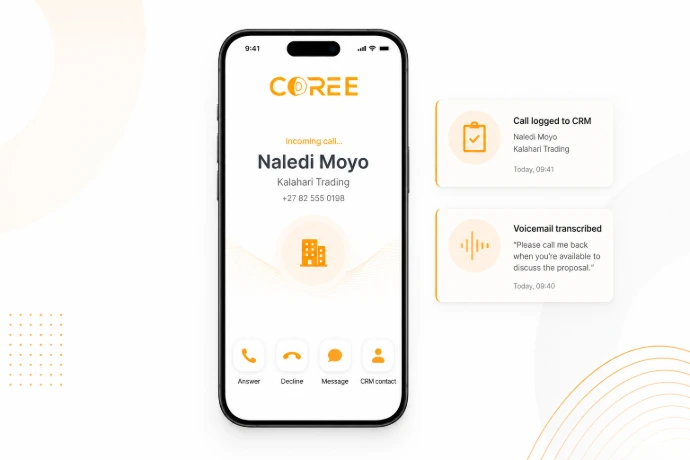
Keep business communication organized
Bring calling activity and customer information into a connected business workflow.
Connected Communication
Keep relevant call activity connected with contacts and customer records.
Customer Context
Give teams access to relevant customer information alongside communication activity.
Better Follow-Up
Keep calls connected with the business records used for ongoing follow-up.
Connected with your COREE ecosystem
Keep business calling connected with customers, sales activity, contacts and other relevant workflows.
VoIP — Business Calling
 CRM — Customer Relationships
 Sales — Sales Activity
 Contacts — Customer Details
"COREE VoIP helps our team keep business communication connected with customer records and day-to-day sales activity."
— COREE Business Customer
Ready to connect your business calls?
Start using Coree VoIP today or book a personalised demonstration with our team.
No credit card required • Instant access