
Expenses made simple
Capture, submit, review and approve employee expenses while keeping receipts, employees, projects and accounting records connected.
Expenses • Receipts • Employees • Approvals • Projects • Accounting
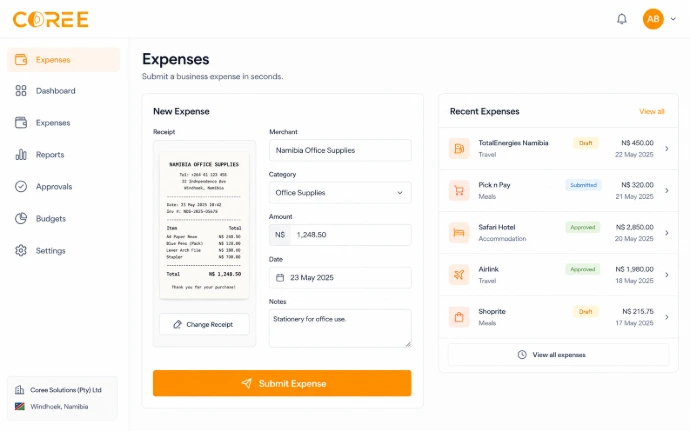
Submit expenses with supporting receipts
Keep expense information organized
Employees can record expense information and attach relevant receipts and supporting documents before submission.
Available document-processing tools can assist with capturing information from receipts before the expense is submitted.
Capture • Submit • Approve • Process
Structured expense approvals
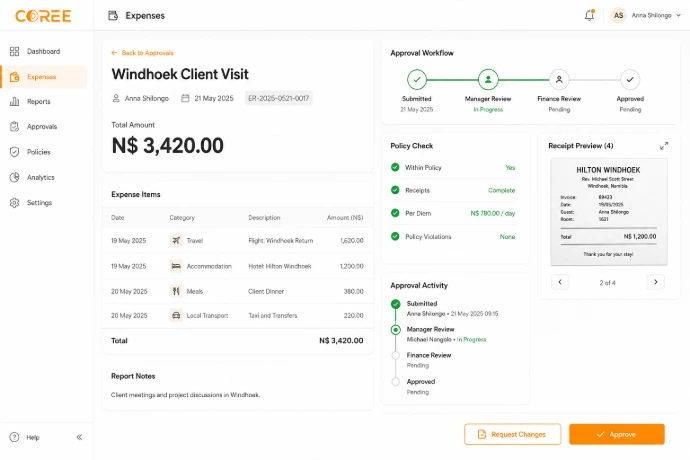
Define expense review and approval responsibilities according to your internal business process.
Keep submitted expenses, supporting documents, approvers and decisions connected in one workflow.
Submission — Employees submit expense details and supporting information.
Review — Relevant expense information can be reviewed before a decision.
Approval — Record the appropriate approval decision for submitted expenses.
Accounting — Keep approved expenses connected with relevant financial records.
A simple expense workflow
Manage employee expenses from capture and submission through approval and accounting follow-up.
Capture
Record expense information and attach relevant receipts or supporting documents.
Submit
Submit the expense for the relevant review process.
Approve
Review expense details and record the appropriate approval decision.
Process
Keep approved expenses connected with relevant accounting activity.
Expense management features
Manage receipts, expense details, employees, approvals and accounting information from one connected workspace.
Receipt Management
Attach and organize receipts and supporting expense documents.
Expense Details
Record relevant categories, dates, amounts, employees and expense information.
Multi-Currency
Record expenses in supported local and foreign currencies where configured.
Approval Management
Keep expense submissions connected with relevant review and approval activity.
Employee Expenses
Keep submitted expenses connected with relevant employee information.
Supporting Documents
Keep receipts and other supporting documents with relevant expense records.
Project Expenses
Keep relevant expense information connected with project activity.
Accounting Connection
Keep approved expenses connected with relevant financial records.
Manage different types of business expenses
Keep employee and operational spending organized across everyday business activities.
Employee Expenses
Record and review expenses submitted by employees with relevant supporting information.
Project Expenses
Keep relevant expense information connected with project activity.
Business Costs
Organize operational expense records and supporting information.
Travel Expenses
Record relevant employee travel expenses with receipts and supporting information.
Employee Purchases
Record business purchases made by employees and keep the relevant receipts attached.
Expense Processing
Keep approved expense information connected with relevant accounting activity.
Keep expense activity connected
Give employees, managers and finance teams one structured place to manage expense information.
Organized Expenses
Keep expense reports, receipts and supporting information together.
Approval Visibility
Review relevant expense status and approval information from one workspace.
Connected Accounting
Keep approved expenses connected with relevant financial records.
Connected with your COREE ecosystem
Keep expense information connected with accounting, employees, projects and other business processes.
Expenses — Expense Management
 Accounting — Financial Records
 Employees — Employee Records
 Projects — Project Expenses
"COREE Expenses gives our team one connected place to manage expense submissions, receipts, approvals and financial records."
— COREE Business Customer
Ready to simplify expense management?
Start using Coree Expenses today or book a personalised demonstration with our team.
No credit card required • Instant access